
Frame Rate, Shutter & Resolution
Capture conditions are set using Framerate, Shutter, Resolution in the Record setting panel on the right side of the screen.
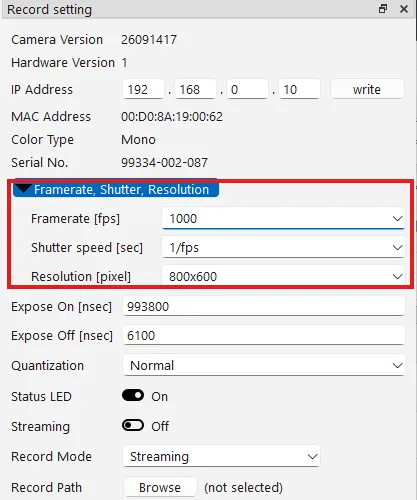
| Item | Contents |
|---|---|
| Framerate [fps] | The number of frames captured per second |
| Shutter speed [sec] | The exposure time per frame |
| Resolution [pixel] | The image size (width x height) |
Setting procedure
Section titled “Setting procedure”Setting frame rate → resolution → shutter speed, in that order, reduces the chance of unintended automatic changes.
-
Choose the frame rate from the Framerate [fps] list.
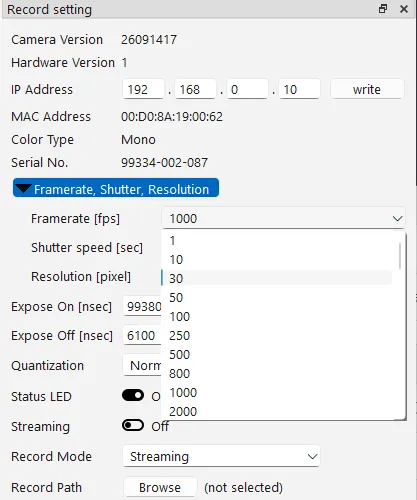
-
Choose the image size from the Resolution [pixel] list. The higher the frame rate, the smaller the selectable height (the number of pixels in the vertical direction).
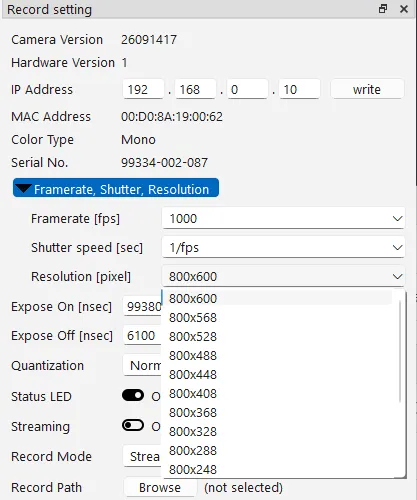
-
Choose the shutter speed from the Shutter speed [sec] list. You can choose
1/fps(open: exposing for the entire duration of one frame) or a shorter shutter speed.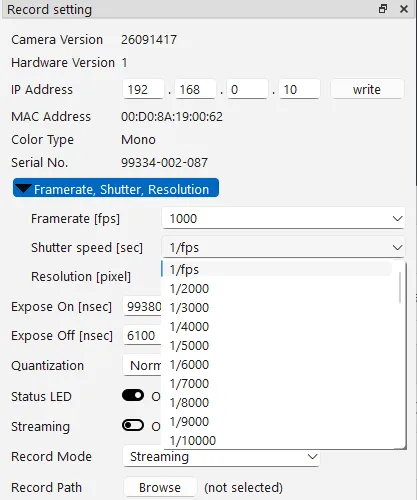
Behavior when changing the frame rate
Section titled “Behavior when changing the frame rate”Changing the frame rate automatically changes the resolution and shutter speed as follows.
| When raising the frame rate | When lowering the frame rate | |
|---|---|---|
| Resolution | Changes to the maximum resolution settable at the new frame rate | No change |
| Shutter speed | Changes to 1/fps (open) |
Changes to 1/fps (open) |
Example: Starting from 1,000 fps with a shutter speed of 1/4000, changing to 2,000 fps sets the resolution to the maximum value for 2,000 fps, and the shutter speed changes to 1/fps.